Home / Products / IBM/TOSHIBA POS Terminal Parts
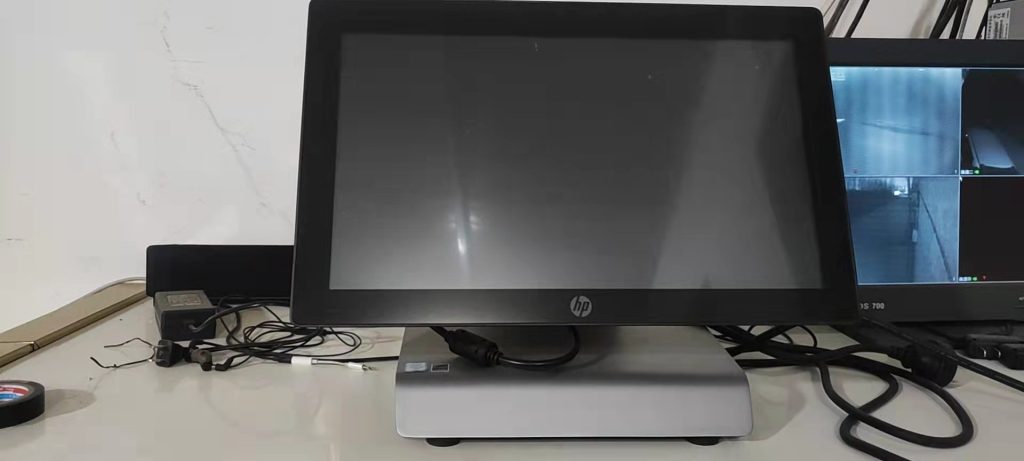
HP RP9 POS Terminal
ORIGINAL NEW PART
Product Inquiry
Category: IBM/TOSHIBA POS Terminal Parts
All parts are original new, tested before shipping. We can give you a good price, especially for big orders.
Price on inquiry — fastest delivery in 3 Days worldwide.
Email: leoli020@163.com
Tel: +86-15914391946 · WhatsApp: +8615914391946
Description
HP RP9 POS Terminal: Repair and Replacement Guide
If you are searching for 'rp9 pos,' you are probably trying to identify an HP RP9 retail POS system, confirm a replacement part, or decide whether a failed terminal is worth repairing. The exact answer depends on the model and configuration in front of you, not only on the RP9 name. This guide explains how to narrow the inquiry, check compatibility, and prepare the details a POS parts supplier needs to respond accurately.
What 'RP9 POS' Usually Means in a Parts Inquiry
'RP9 POS' is generally used as shorthand for the HP RP9 retail POS system family. You may see the same system written as HP RP9, HP RP9 G1, or RP9 POS. In a parts inquiry, however, the phrase is not a specific part number. Two buyers can use the same search term and mean different things: a complete terminal, a configured system, or a replacement component inside the unit.
That is why the first step is not to order by name. It is to identify the exact asset in front of you. A model label, serial number, and the markings on the failed part are more useful than a generic RP9 description.
Identify the Asset Before You Source Parts
Before contacting a supplier, collect the details that distinguish one RP9 system from another:
- The full model name and model number from the product label.
- The serial number, if it is readable.
- The part number, FRU, SP number, or other markings on the failed component.
- Clear photos of the label, connector, mounting points, and any visible damage.
- The system configuration, including touch or non-touch setup, attached peripherals, and any revision information you can see.
If you are not trained to service POS hardware, arrange inspection by a qualified technician. Accessing internal components while the unit is powered can create safety and equipment risks.
Parts and Service Areas to Check
Depending on the configuration, an HP RP9 maintenance project may involve the display or touch assembly, system board, power supply, storage, cabling, peripheral connections, mounting hardware, or other parts. Not every RP9 system uses the same components, so a generic category is only a starting point. The part must match the exact model and revision.
Use the symptom to narrow the category, not to guess the part:
- No power: check the power source, external cable, power supply, and board connections.
- Display or touch problem: check the panel, touch assembly, internal cables, and configuration settings.
- Peripheral problem: check the port, cable, peripheral device, and any adapter.
- Boot or storage problem: check the storage device, board, and connections.
These are general troubleshooting categories. They do not confirm that a specific component is compatible with a particular RP9 system.
Compatibility Checklist Before Ordering
| Check | Why it matters | What to record |
|---|---|---|
| Exact model and serial | The RP9 name can cover multiple configurations | Label photo, full model, serial number |
| Part number or FRU/SP number | A similar name is not a matching part | All markings on the old component |
| Connector and mounting | Physical fit must match | Connector type, pin count, screw holes, orientation |
| System configuration | Options can change the required part | Touch or non-touch, peripherals, power setup, revision |
| Condition and testing | Availability and condition vary by listing | New, used, or refurbished status; test notes; warranty terms |
| Delivery and destination | Lead time depends on the part and location | Quantity, country, and required date |
Do not rely on the phrase 'RP9 POS' alone when ordering. If the part number is missing, ask for help identifying it from clear photos and label details before placing an order.
Repair or Replace?
Repair can be practical when one component has failed, the rest of the terminal is stable, and the correct part can be identified. Replacement may make more sense when several critical systems have failed, the unit has repeated downtime, or the configuration is no longer practical to maintain.
This decision should include more than the part price. Consider downtime, technician time, configuration migration, peripheral compatibility, and the risk of repeat failures. A repair that restores a checkout lane quickly can be valuable, but only if the replacement part is correctly matched to the system.
What to Send in a Parts Inquiry
A useful inquiry gives the supplier enough information to check the exact item rather than guess from the model family. Include:
- The full model name and model number.
- The serial number, if available.
- The part number, FRU, SP number, or markings from the old part.
- Clear photos of the label, part, connector, and mounting area.
- The quantity required.
- The delivery country and required date.
- Any known condition details, such as damage, burn marks, or previous repairs.
If the exact part number is unknown, state that clearly. Good photos and label details are more useful than a generic request for an 'RP9 part.'
Sourcing and Support
posbarcodeparts is a POS, label, and ATM equipment and repair parts supplier. The company profile states that it was founded in 2010, serves 30+ countries, lists 418 products in stock, and provides a fastest delivery time of 3 days plus installation guidance. These are company-published capabilities; confirm the exact RP9 part, condition, availability, and schedule for your request.
Related HP POS parts: the catalog also lists an HP RP 5700 POS system board, SP# 578188-001 and DG# 439753-00. This is a separate HP POS model, and the listing does not state compatibility with the HP RP9. It is useful only as a reference for how HP POS parts are identified; verify the exact RP9 part before ordering.
A Practical Next Step
Prepare the model, serial, part number, photos, quantity, destination, and required date. Send them through the inquiry path and ask for compatibility confirmation before purchase. If the exact part is not yet identified, say so clearly; a supplier can work from good photos and labels, but only if the information is accurate.
For an HP RP9 POS terminal, the safest path is simple: identify the asset, verify the part number, confirm compatibility, and then order. That process reduces the risk of buying a component that looks similar but does not fit the system.